
Introduction
In this blog post, I will explain the process that I took to migrate our React app code base to TypeScript starting in 2021. I publish this post as a true story of what happened to a relatively small project and I hope that someone can learn from this. Many of the versions have been updated already, but the post that I wrote mainly in 2021 still stands as a testament to the process.
It is now two years later (2023), and I still have not been able to turn the strict mode on to disallow any-types, but that is okay. The codebase is better than it has ever been and despite the few any-types the migration has been a success overall. I planned to release this blog post when the migration is completely finished, but I am okay with the incomplete nature of this project, like many projects in life. There is always some room to improve. Here is the process.
Why TypeScript?
I have been looking into migrating to TypeScript for a while to help with the auto-complete during development. That should also help to better reuse components when we can better define what props each generic dialog or button component takes. These were the main reasons to look into migrating the codebase to TypeScript.
TypeScript should also help with bugs that only show their ugly head during runtime, but are caused by non-compliant data types. TypeScript helps us better define the Redux state to make it harder to change it without understanding which components use the state and expect a certain type to exist. These points will only get more prominent in large projects with multiple teams working on the same codebase, and large companies like Google and Facebook have come to the same conclusion repeatedly 1. Thus, this should help my team as well with the aforementioned issues.
Preconditions
Versions that I was using at the start of the migration in 2021
- react: 16.8.0
- react-scripts: 3.4.1
- typescript: 4.1.2
Because React Scripts 2 and later support TypeScript out of the box, migrating a project is pretty straightforward, and this blog post covers only this use case. If your project is not using React Scripts or it is older, you may find this tutorial from Microsoft2 more helpful.
Before starting the migration process all of your engineers should have read the TypeScript handbook3 so that you can eliminate confusion and make the process as easy as possible. However, there are many ways that you may have configured your React project, so you may have to go through the migration process just by solving each compilation error as they come.
I first started to go through the process without any tools, but soon figured out that before I can run the project as a TypeScript, I need to do the typing for each file that we changed to a .ts file. You could do it gradually, by having a mix of .js and .ts files in our codebase, but that seemed messy and I was unhappy with the progress that I was making. I did a little searching and found out that I can do the migration using a script.
Automated migration
To speed up the process, and to make it obvious to our team that from now on, all the new code should be typed and only .tsx and .ts files are accepted, we used the Airbnb ts-migrate tool to automatically run this process and put ‘any’ types where the tool was not able to deduce the type from PropTypes and context. You can find a blog post about ts-migrate tool here4.
Our codebase is still small, so I just straight up ran the ts-migrate after installing it globally via NPM. For a larger project, it may not be feasible to run this in the root directory.
> ts-migrate rename
Renaming 79 JS/JSX files in ~/gitrepos/react-client...
Done.
> ts-migrate migrate
TypeScript version: 4.1.2
Initialized tsserver project in 4.6s.
Start...
[strip-ts-ignore] Plugin 1 of 14. Start...
[strip-ts-ignore] Finished in 304ms.
[hoist-class-statics] Plugin 2 of 14. Start...
[hoist-class-statics] Finished in 69ms.
[react-props] Plugin 3 of 14. Start...
[react-props] Finished in 281ms.
[react-class-state] Plugin 4 of 14. Start...
[react-class-state] Finished in 56ms.
[react-class-lifecycle-methods] Plugin 5 of 14. Start...
[react-class-lifecycle-methods] Finished in 11ms.
[react-default-props] Plugin 6 of 14. Start...
[react-default-props] Finished in 2ms.
[react-shape] Plugin 7 of 14. Start...
[react-shape] Finished in 2ms.
[declare-missing-class-properties] Plugin 8 of 14. Start...
[declare-missing-class-properties] Finished in 16s.
[member-accessibility] Plugin 9 of 14. Start...
[member-accessibility] Finished in 2ms.
[explicit-any] Plugin 10 of 14. Start...
[explicit-any] Finished in 41.6s.
[add-conversions] Plugin 11 of 14. Start...
[add-conversions] Finished in 27.7s.
[eslint-fix] Plugin 12 of 14. Start...
[eslint-fix] Finished in 23.7s.
[ts-ignore] Plugin 13 of 14. Start...
[ts-ignore] Finished in 57.1s.
[eslint-fix] Plugin 14 of 14. Start...
[eslint-fix] Finished in 6.6s.
Finished in 2m 53.5s, for 14 plugin(s).
Writing 78 updated file(s)...
Wrote 78 updated file(s) in 11ms.
After all, this process was done in a couple of minutes. However, the project did not compile right after, because we were still missing the type definitions of the packages. Therefore, the next task was to add all the type definitions to the project.
I installed the types for the packages, based on what TypeScript was complaining about. For example, for the following packages, we installed the types from the Definitely Typed project5.
// ./package.json
"devDependencies": {
    "@types/history": "^4.7.8",
    "@types/ramda": "^0.25.0",
    "@types/react": "^16.8.0",
    "@types/react-dom": "^16.8.0",
    "@types/react-redux": "^7.1.16",
    "@types/react-router": "^5.1.11",
    "@types/react-router-dom": "^5.1.7",
    "@types/redux-saga": "^0.10.5"
}
Because the Definitely Typed project aims to add the types to each project that does not, yet at least, provide the TypeScript typings within the official package, you can usually just try to install the @types/package-name and checking if the TypeScript error goes away.
For some packages, we were getting issues with missing types. With a quick check in the node_modules folder, the package seems to include the types, however. It turns out that for some packages, you need to declare the module in a separate d.ts file for the linter to realize where to find the type definitions. A d.ts file is a type definition file that you can simply add to the root of the src-folder, and the linter can find it and include it within all of your files in the project. So for example, the following packages we had to add in a separate file that we just called react.d.ts since they were all related to React. For the rest of the react packages, this was not necessary.
// ./src/react.d.ts
declare module 'react-helmet';
declare module 'react-router-dom';
declare module 'react-intl';
However, sometimes there is are no @types-package for the NPM package and the original package does not provide them. I found a couple of these kinds of packages, but then soon realized that those packages have been replaced by a newer project, which would be a simple package change. In both of those cases, I simply switch to using the official component of the Material UI that had not been implemented yet when the page was first created a couple of years ago. This was then a simple job of just switching the package. It’s not a good idea to keep unmaintained packages in our codebases anyway, due to security reasons. Thus, this migration turned out to be a good catalyst for checking all the dependencies whether we need them or not.
After this ordeal, the project finally compiled and I was able to run it. It worked flawlessly. That was expected though because I did not do anything dramatic to the final JavaScript code. I merely added one more layer of abstraction, i.e. TypeScript, that simply compiles into the JavaScript code that we are used to. This was the end of day one of the migration.
The brunt of the work
Prop types
Albeit, all files were now .ts or .tsx and the project compiled, the migration project was not over. The ts-migrate did its best to guess the correct types of props-objects that were passed into each React component based on the PropTypes definitions and context. However, most of the time, it was not able to decipher the correct type, and simply addressed the type as ‘any’ which is TypeScript’s way of making it easier to migrate codebases. The ‘any’ type is exactly as it sounds. It means that we are nowhere closer to proper typing than we were with vanilla JavaScript, since ‘any’ type variables can be set to anything. With a quick search through the codebase, ts-migrate annotated more than a thousand variables with ‘any’ in this small codebase alone. Then I realized that we still need to do most of the migration work ourselves, and simply spend the time to manually set each type. The next chapter in the migration project was to define and check each type, one file or feature at a time.
An example of the kind of typing ts-migrate left in its tracks:
// ./src/components/NumberField.ts

import React from 'react'
import TextField from '@material-ui/core/TextField'

type Props = {
    id?: string;
    name?: string;
    label?: string;
    onChange?: (...args: any[]) => any;
    value?: any;
}

const NumberField = ({ id, name, label, onChange, value }: Props) => {
    return (
        <TextField
            id={id}
            name={name}
            type="number"
            onChange={event => onChange(event)}
            value={value}
            label={label}
        />
    )
}

export default NumberField
As you can see, some of the types are correctly typed, although, even they are set to optional, which is not what we want. All function signatures are also using any types which require us to understand the proper arguments and return types. We are using Material UI which comes with the TypeScript definitions already. This will help us during the migration process.
To migrate the file, I defined the onChange-function signature, removed the optional tags, and defined the type of value to be number. The state of this form is handled in the parent component. To find the proper types for the signature of the onChange-function, we can simply hover over the onChange-parameter of the TextField-component in VS Code to see the signature.
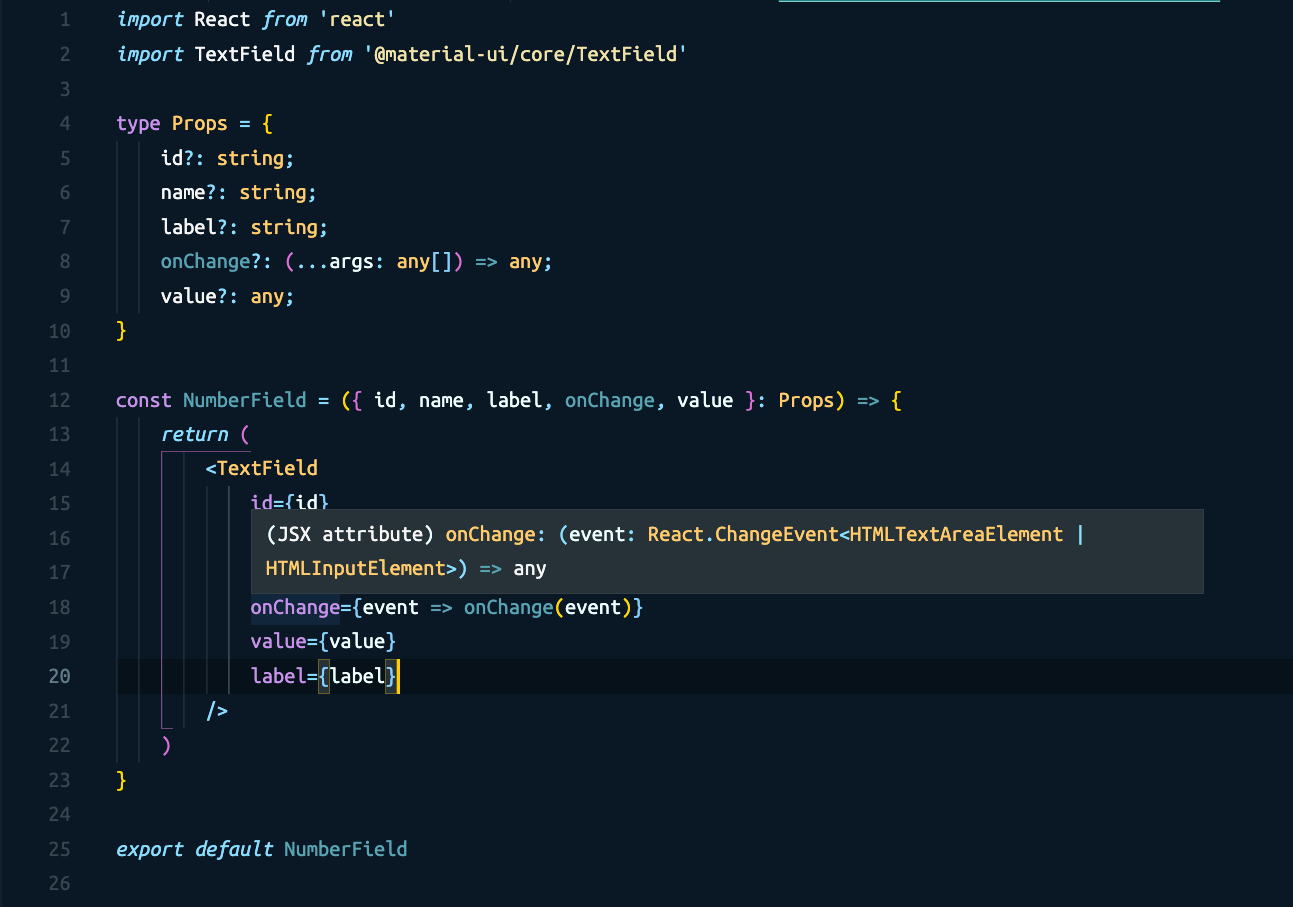
Now, I simply copy the event-parameter type to the Props of this NumberField-component and we are done with typing the component. After this, the parent component knows what data the onChange-function sends. See the final Props-type after the manual definitions:
// ./src/components/NumberField.ts

import React from 'react'
import TextField from '@material-ui/core/TextField'

type Props = {
    id: string;
    name: string;
    label: string;
    onChange: (event: React.ChangeEvent<HTMLTextAreaElement | HTMLInputElement>) => void;
    value: number;
}

const NumberField = ({ id, name, label, onChange, value }: Props) => {
    return (
        <TextField
            id={id}
            name={name}
            type="number"
            onChange={event => onChange(event)}
            value={value}
            label={label}
        />
    )
}

export default NumberField
I simply need to repeat this process for each component that I come across, and eventually, the migration will be done. This took several weeks to do and I did it gradually when working on other tasks that were to be added to a new release.
Redux state and FIXME errors
Not only there were ‘any’ types everywhere, but ts-migrate also added comments to block TypeScript compilation errors when it was not able to determine the types properly or they mismatched. These were usually caused by incorrect or missing return types of custom React components that we had to type. The most common issue, however, was the React Redux Connect and the import of the Redux state to the component. This was a typical way that we had declared the mapStateToProps and mapDispatchToProps functions. First of all, the state is set to ‘any’, and there is a FIXME comment by ts-migrate to fully define the props of the component better.
// ./src/components/ItemsPage.ts

// ItemsPage.ts component body ...

const mapStateToProps = (state: any) => ({
    isUpdating: state.items.isUpdating,
    products: state.items.products
})

// @ts-expect-error ts-migrate(2345) FIXME: Argument of type 'ConnectedComponent<typeof ItemsP...
export default withRouter(connect(mapStateToProps, { addItem, getItem, updateItem })(ItemsPage))
First things first, I had to declare how the state looks like, and be ready to import the shape of the state to each component. This can be done easily with the utility type ReturnType, which creates a new type based on the return type of a function 6. In this case, I use it to create a composite type of all the reducers. This way I do not need to come and edit this type definition if one of our reducers’ state’s type changes.
// ./src/index.ts

// index.ts body ...

const reducers = combineReducers({
    items,
    auth,
    router: connectRouter(history)
})

export type RootState = ReturnType<typeof reducers>
Now I have the RootState type exported, so I can use it. Now I defined the ItemsPage component Redux Connect functions in the following way.
// ./src/components/ItemsPage.ts

import { connect, ConnectedProps } from 'react-redux'
import { RouteComponentProps, withRouter } from 'react-router'
import { RootState } from '../index'

type ItemsPageState = {
    dialogOpen: boolean;
}

class ItemsPage extends Component<Props, ItemsPageState> {
    state = {
        dialogOpen: false,
    }

    // component body ...

    render(): JSX.Element {
        return (
            <div>Items</div>
        )
    }
}

const mapStateToProps = (state: RootState) => ({
    isUpdating: state.items.isUpdating,
    products: state.items.products
})

const mapDispatchToProps = {
    addItem,
    getItem,
    updateItem
}

const connector = connect(
    mapStateToProps,
    mapDispatchToProps
)

type PropsFromRedux = ConnectedProps<typeof connector>
type Props = RouteComponentProps & PropsFromRedux
export default withRouter(connector(ItemsPage))
Now the RootState is used to import the definition of the state to the mapStateToProps-function so that we can take full advantage of TypeScript when writing our components. I know exactly which fields we have in the state when accessing them. I use the ConnectedProps and RouteComponentProps types, that are provided by React Redux and React Router to build the final Props-type that is then passed into the component ItemsPage. Notice the type definition for the Component<Props, ItemsPageState>, including ItemsPageState as the second argument to define the type of the component state. Also, notice the return type definition of the render-function. It is set to ‘JSX.Element’, which is the return type of the React Component. This way, TypeScript knows that we can include this page onto other components within their render-functions and use them as ‘JSX.Element’s, without compilation errors.
The rest of the migration was painless when I started to get the hang of the types and the way TypeScript communicates with you. To decipher the errors, this Deciphering TypeScript’s React errors article is a great read7.
To make the benefits even more pronounced to us right from the get-go, I found this tool called ts-prune8 that quickly checks your codebase for dead code and unused functions. This also forced us to check and rewrite much of the code in a better way, so I do recommend it if you feel that your React project has a lot of technical debt that has not been touched in years. You to take a look at that code, and once you are touching it, you might as well rewrite it in a better, more performant way, or using newer functional components and hooks.
Conclusion
The migration process was not as easy as I understood from the TypeScript documentation, however, that is more caused by the weakly typed nature of JavaScript. As the Airbnb team point out in their article 4, the process will take months for a large project. I was not working on the migration full time, but rather did the migration on the side. The outcome is a better codebase than it was before, despite the fact that some of the any-types still remain in the codebase. Any new code that I or my team write is now much better then with vanilla JavaScript.

